
Use case · Customer feedback
Hear what customers won’t
put in a survey box
Ratings tell you satisfaction dropped. They don’t tell you which moment broke it or why someone cancelled. Send one link and let an AI interviewer ask each customer about their experience, then read the transcripts and summaries.
Free plan · 5 interviews · 10 min total · no card

The problem
You have scores, not reasons
Most feedback programs measure how customers feel without capturing what happened.
Scores without context
An NPS of 6 or a two-star review starts the question. The comment box, if anyone fills it in, rarely answers it.
Cancellations go quiet
A dropdown of “too expensive / not using it” hides the real story, and customers who leave rarely take a call.
Customer calls are hard to keep up
Teams mean to talk to customers every month. Scheduling and note-taking win, and the calls stop after the first few.
How it works
From question to customer voice this week
- 1
Describe what you want to learn
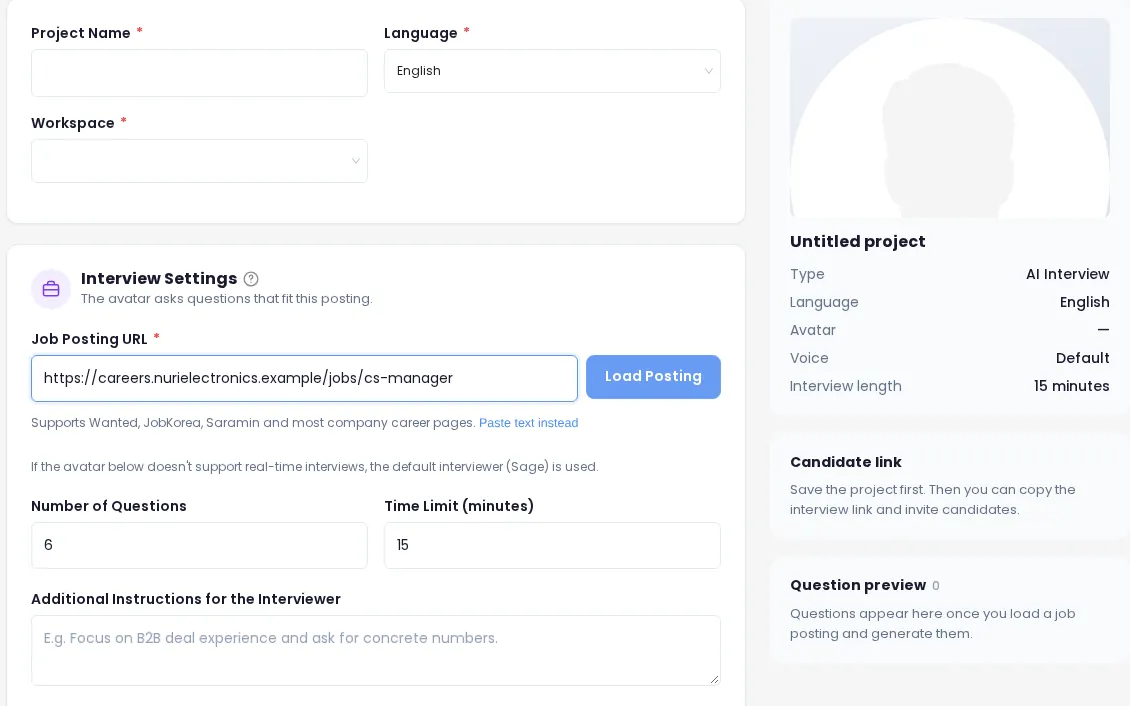
Write a few lines: which customers, which experience, what decision this feeds. Questions are drafted for you. Edit them, add must-ask questions and tell the interviewer to ask for concrete examples.
- 2
Run it on yourself
Take the interview once as a customer would, and fix anything that sounds like a sales pitch or a leading question.
- 3
Send it where customers already are
Put the link in an onboarding email, a support follow-up or a cancellation message. Customers answer in a browser without an account, in any of 12 languages. On paid plans, invite a whole list at once with reminders.
- 4
Read and share the findings
Each interview leaves a recording, full transcript, summary and highlighted answers. Export to CSV, tag the issues and send share links to product and support.
Example question set
Questions that turn complaints into fixes
A starting point for an experience or exit interview. Edit freely; the AI interviewer asks one follow-up when an answer stays vague.
- What were you hoping to get done when you started using the service?
- Walk me through the last time you used it. Where did things go smoothly, and where did you get stuck?
- What is the most frustrating part of using it today? What did you do to work around it?
- If you contacted support, how did it go? What would have made it better?
- What one improvement would make the biggest difference for you?
- If you cancelled or are thinking about it, what was the main reason? Was there a moment that tipped it?
Specifics, not ratings
A follow-up question on every vague answer
“It was confusing” isn’t something a team can fix. When an answer stays general, the AI interviewer asks one follow-up, so you hear which screen, which step and what the customer expected instead. Every customer hears the same questions, so you can compare answers across interviews.
- Questions drafted from your description, fully editable
- Must-ask questions and extra instructions for the interviewer
- 12 interview languages for customers in different markets
Feedback your team can use
Summaries to skim, transcripts to quote
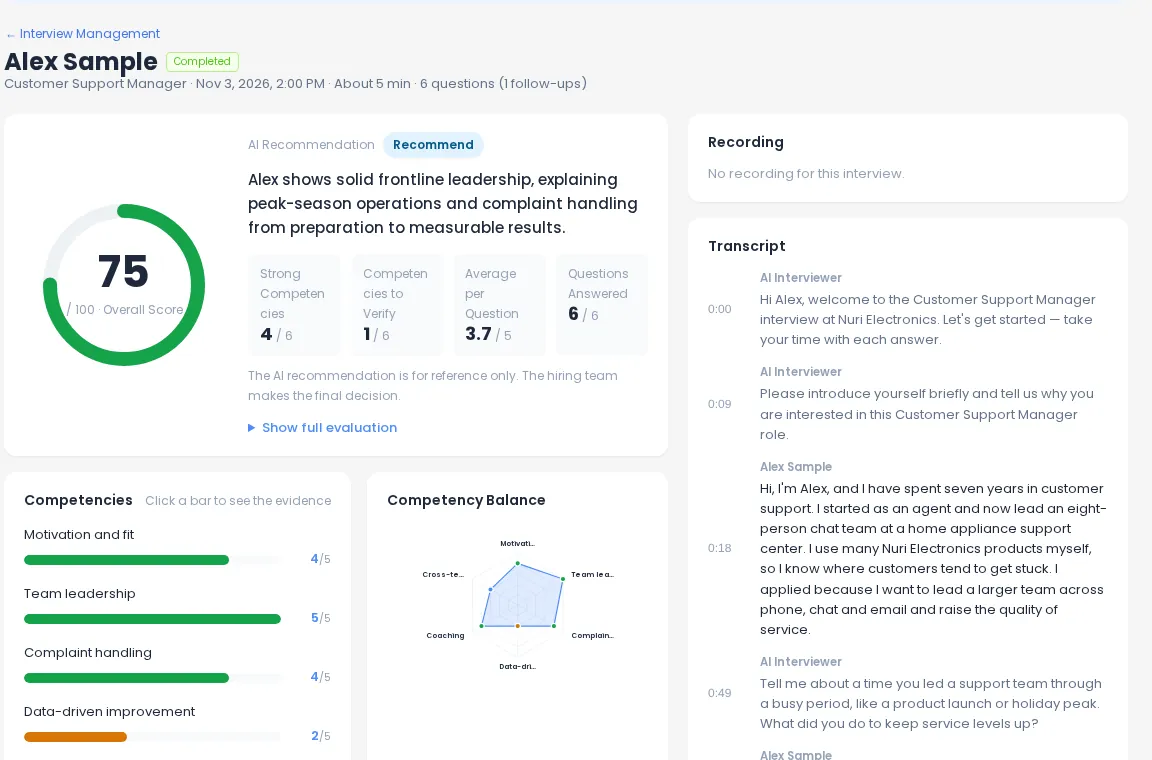
Read the summary of each interview first, check the highlighted answers, and open the full transcript when you need the customer’s exact words for a ticket or roadmap discussion. Export to CSV and group the issues in the tools your team already uses.
- Summary and key answer highlights per customer
- Recording and full transcript side by side
- CSV export and share links for product and support
When to upgrade
Try it on Free, run it every month on a paid plan
Prices are public, monthly or annual (20% off). Upgrade by card when you want to keep listening.
Free: test your questions
5 interviews · 10 minutes total, one-time. Try the interview with a few friendly customers first.
Recruiter: a monthly customer program
40 interviews a month, interviews up to 60 minutes, bulk invites with reminders, and CSV/PDF export for your VOC log.
Hiring Team: product, support and CX together
150 interviews a month, 5 seats, and team comments on each interview. Extra interviews are $1.5 each.
Customer feedback FAQ
Why interview customers instead of sending an NPS survey?
A score tells you that something is wrong. A conversation tells you what and why. The AI interviewer asks open questions about real experiences and follows up when an answer is vague, so you get specifics you can act on.
Can I interview customers who just cancelled?
Yes. Create a short exit interview and send the link in your cancellation email or follow-up message. Customers answer in a browser, without an account, whenever they have a few minutes. Keep it short and optional; people who just left are doing you a favour.
Does it categorize feedback automatically?
Not automatically. Every interview comes with a full transcript, a summary and highlighted answers. On paid plans you can export to CSV and tag the feedback in the spreadsheet, help desk or product tool your team already uses.
Can I run customer interviews every month?
Yes. Keep the same interview and send it to a new group of customers each month with bulk invites and reminders. Recruiter includes 40 interviews a month and Hiring Team 150. Sending is manual; there is no automatic schedule or CRM trigger yet.
The app mentions job postings and candidates. Does that matter?
The product began as a hiring tool, so some screen labels use hiring terms. Where it asks for a job posting, describe who you are interviewing and what you want to learn, then rewrite the drafted questions in your own voice.
Can product and support teams see the results?
Send a result share link that opens without sign-in until it expires. For several people reviewing and commenting together, Hiring Team includes 5 seats.
Talk to more customers, without more calls
Start with one interview link in your next customer email.