
Candidate experience
An interview candidates can take on their own time
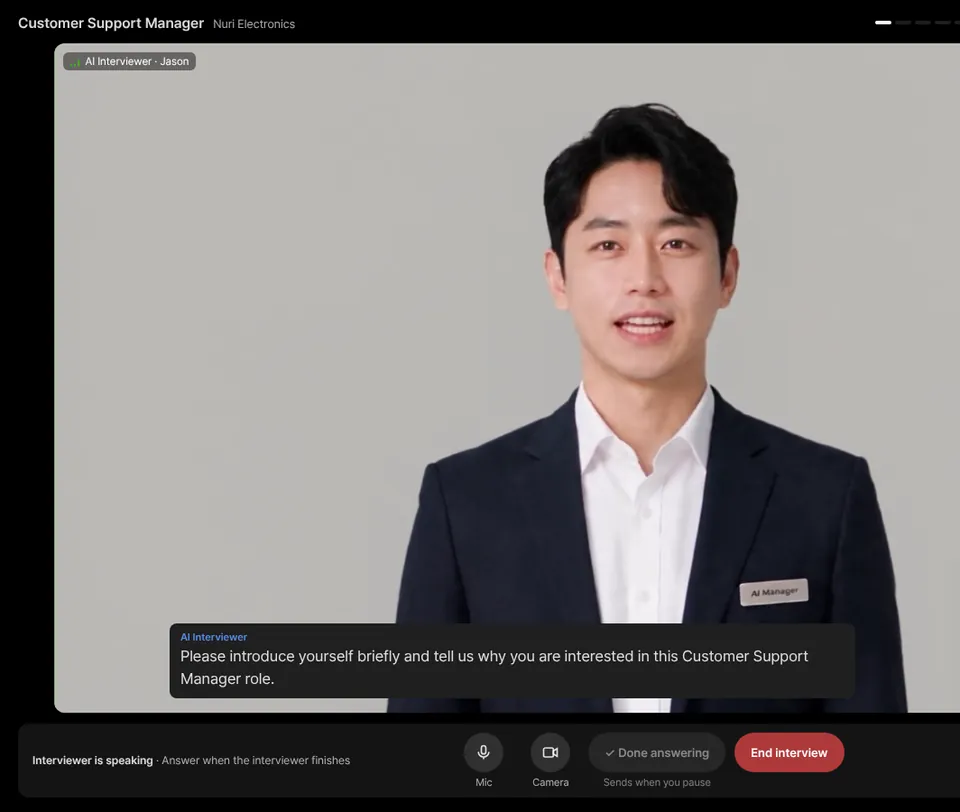
No account, no payment, no scheduling. Candidates open a link, try a short practice round, and talk with an AI interviewer in the language you set. If the connection drops, the same link brings them back.
You can take your own interview first to see exactly what candidates see.
Fewer reasons to drop off
What candidates don’t have to do
Every extra step between an invite and a finished interview costs you applicants. AI Interview removes the ones that usually get in the way.
No account or payment
Candidates open the invite link and start. Their name and email go on the start screen; there is nothing to sign up for and nothing to pay.
No call to book
The link stays open until the deadline you set, so candidates pick a time that works for them — evenings, weekends, any time zone.
No language barrier
Set the interview language per project from 12 languages. The screen, questions, voice and captions all switch to it.
No typing into a chat box
A talking avatar asks the questions out loud and candidates answer by speaking, the way they would with a person.
No rushing
Pausing doesn’t skip ahead. The next question comes only when the candidate presses “Done answering”.
No lost attempt
If the connection drops or the window closes, the same link brings the candidate back in.
The candidate’s journey
From invite link to finished interview
- 1
Open the link
Personal invites go to one person by email and close after the period you choose (3, 7, 14 or 30 days). An open link can be shared on a job post so anyone can apply. Reminders can go out automatically to candidates who haven’t started.
- 2
Read the start screen
The start screen shows the role, the number of questions and the time limit. Candidates enter their name and email, read how the interview works and give consent. If you allow it, they can upload a resume to get 2–3 extra questions about their experience.
- 3
Practice for a minute or two
A short practice round checks the camera, microphone and connection, then asks two warm-up questions. Nothing in the practice round is recorded or scored, and candidates can skip it.
- 4
Talk with the AI interviewer
The avatar greets the candidate, asks each question and follows up on the answers. Questions also appear under the avatar, with captions, progress and time left in view. When it ends, the recording and answers go to your team’s report and the candidate can simply close the window.
Consent on the start screen
Candidates know what happens before they start
Before the interview begins, candidates confirm that it is recorded, that AI evaluates their answers and sends a report to your hiring team, and that the report may be shared with people involved in the decision through a time-limited, read-only link.
- Voice and expression scoring is a separate, optional consent — candidates can take the interview without it
- Voice and expression scoring is not offered in the EU
- If you turn on screen-leave and paste recording, candidates see a one-line notice first
- An uploaded resume is read to prepare questions; the file itself is not stored
When things go wrong
Interruptions are handled, not punished
Real candidates lose Wi-Fi, close tabs and get interrupted. Here is what happens in each case.
| Situation | What the candidate sees | What happens |
|---|---|---|
| Connection drops mid-interview | “Continue interview” on the same link | They pick up from the question they were answering. Remaining time carries on from the first start. |
| Window closed before the end | The same link opens again | They continue where they left off or start over from the beginning. Personal invites allow up to 3 starts. |
| Opened in a second window | A note that the interview is already open | Only one window runs at a time, so answers don’t get split. |
| Long silence | A countdown warning with a Continue button | If no one answers, the interview ends and a report is made from the answers so far. |
| Time limit reached | A closing message from the interviewer | The interview wraps up and the report uses the answers given. |
| Finished, wants another try | A note that the interview is completed | Candidates can’t retake it on their own. You can reset the link from the results screen. |
Recommended setup
What candidates need
- A desktop browser with a camera and microphone (recommended)
- Camera and microphone allowed in the browser’s site settings
- A quiet place where their face is clearly visible on camera
- A stable internet connection for the whole interview
- Time for the full interview — the start screen shows the number of questions and the time limit
Practice mode
A warm-up before the real thing
A one-way video interview can feel strange the first time. The practice round lets candidates get used to talking with an AI interviewer before anything counts.
Device check
Camera, microphone and internet are checked, with fixes shown if something is wrong.
Two warm-up questions
The interviewer asks two easy questions so candidates learn when to speak and when to press “Done answering”.
Not recorded, not scored
Practice answers aren’t recorded or evaluated. It runs once per link and can be skipped.
Frequently asked questions
Do candidates need an account or a credit card?
No. Candidates open the invite link, enter their name and email on the start screen and begin. There is no sign-up and no payment step on the candidate side.
What happens if a candidate’s connection drops?
They open the same link again. On a personal invite, if the interview is still in progress, they continue from the question they were answering and the remaining time keeps counting from the first start; otherwise it starts again from the beginning. A personal invite allows up to 3 starts.
Can a candidate retake a finished interview?
Not by themselves. Once an interview is finished (including when time runs out) or the candidate ends it, the personal link is closed. If you want to give someone another try, you can reset the link for that candidate from the results screen.
Which device should candidates use?
A desktop browser with a camera and microphone is recommended, in a quiet place with a stable internet connection. The camera and microphone need to be allowed in the browser’s site settings.
Is the practice round scored?
No. The 1–2 minute practice before the interview is not recorded or evaluated. It checks the camera, microphone and connection and lets the candidate try two warm-up questions. It runs once per link and can be skipped.
What language does the interviewer speak?
You choose the interview language for each project from 12 languages. The start screen, the questions, the interviewer’s voice and the captions all follow that language.
Send your first interview link today
Take the interview yourself first, then share it. The Free plan includes 5 interviews · 10 min total (one-time, at sign-up), no card needed.