
Use case · Staffing & recruiting agencies
Pre-screen for every client.
Send evidence, not just a shortlist.
Run a first-round AI video interview for each client position, compare candidates on that position’s criteria, and send clients the report and recording through a link they can open without an account.
Hiring Team · unlimited projects · 5 recruiter seats
The problem
More clients means more screens, and more to explain
Agency recruiters juggle many roles at once, and every submission has to convince someone who wasn’t on the call.
Screens multiply with every req
Ten clients with three open roles each is thirty pipelines of first calls, all needing a time slot.
Your notes aren’t the client’s evidence
A summary paragraph asks the client to trust you. A scored answer and a recording let them check.
Hard to keep criteria straight
Each client cares about different things. Keeping questions consistent per role across several recruiters is manual work.
How it works
One project per client position
- 1
Set up the position
Paste the client’s job description. Questions and competencies are drafted from it; add the client’s must-ask questions and position-specific criteria. Name the project by client and role.
- 2
Invite your candidates
Send personal invites to up to 50 candidates at once from your list, with a deadline and automatic reminders, or share one link with a talent pool.
- 3
Compare within the position
In Results, filter by position and sort by score or AI recommendation. Every candidate for that role answered the same questions on the same criteria.
- 4
Submit with evidence
Send the client a share link to the report and recording, save the report as a PDF, or export the shortlist to CSV.
Client-ready reports
Share a report your client can open in one click
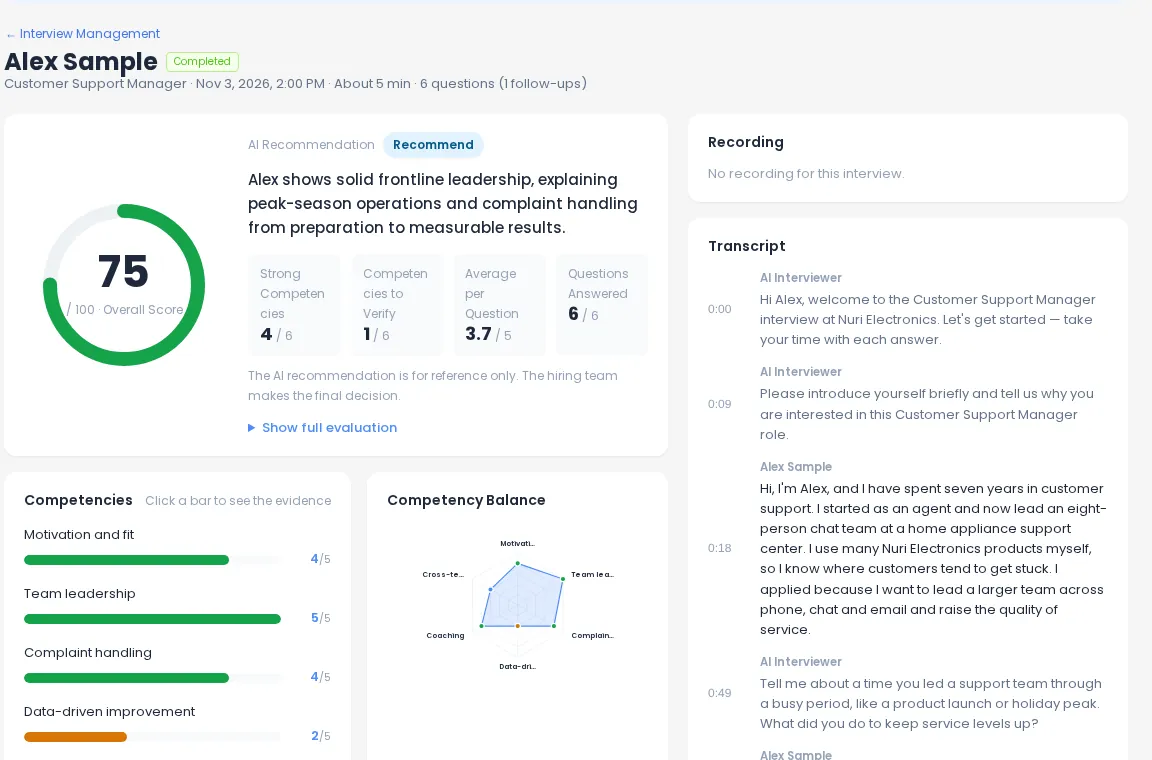
Each report has an overall score, competency and per-question scores, strengths and concerns, the full timestamped transcript and the recording. A share link lets your client view it without signing in.
- Share links work for 14 days, and you can cancel them anytime
- Save as PDF to attach to your submission
- Export a position’s candidates to CSV
Features that fit
What agencies use most
Questions from the client’s JD
New req in the morning, interview link before lunch.
Question generatorShare links, PDF & CSV
Hand clients the evidence in the format they prefer.
Scored reportsTeam review & decisions
On Hiring Team, 5 recruiters comment and record decisions per candidate.
See plansIntegrity signals
Tab-leave and paste counts kept in the report for reference, with a notice to candidates.
Interview integrityMultilingual interviews
Interview candidates in 12 languages for international clients.
Global hiringAPI & MCP
Create interviews and pull reports from your ATS or internal tools.
API & MCPRecommended plan
Hiring Team for agencies with several recruiters
A solo recruiter can start on Recruiter. Most agencies need more projects, more seats and interviews running in parallel.
| Recruiter | Hiring Team | Enterprise | |
|---|---|---|---|
| Price | $49/mo · $39/mo billed annually | $179/mo · $143/mo billed annually | Custom quote |
| Interviews included | 40 a month | 150 a month | Custom |
| Active projects (positions) | 50 | Unlimited | Unlimited |
| Seats | 1 | 5 | 6+ |
| Interviews at the same time | 1 | 30 | Custom |
| Share links, PDF/CSV export | ✓ | ✓ | ✓ |
| Team review, API & MCP | — | ✓ | ✓ |
| ATS integration support · SSO on request | — | — | ✓ |
A simple playbook
Setting up a new client position
A repeatable routine your recruiters can follow for every new req.
- Name the project “Client · Role” so Results and exports stay easy to read.
- Paste the client’s job description, then add the client’s must-ask questions and position-specific criteria.
- Take the interview once yourself and share that report with the client contact as a preview of what they will receive.
- Invite candidates with a deadline that matches the client’s timeline; reminders go out automatically.
- Submit with a share link or PDF, and cancel share links once the client has decided.
Agency FAQ
Can my client see a report without an account?
Yes. Create a share link from the report. Anyone with the link can view the report and recording without signing in for 14 days, and you can cancel the link at any time.
Can I use different criteria for each client?
Yes. Each position is its own project, with its own questions, must-ask questions and position-specific criteria, on top of any criteria you use across all interviews.
How do I keep many clients and roles organised?
Create one project per client position and filter Results by position. Recruiter allows up to 50 active projects; Hiring Team and Enterprise have no project limit.
Can I send results as a file?
Yes. Save any report as a PDF, or export a position’s candidate list to CSV with name, email, status, overall score, AI recommendation, decision and date. Export and share links are included from Recruiter.
Does the AI decide who goes to the client?
No. The AI recommendation is for reference only. Your recruiters review the evidence and choose who to submit.
Can it connect to our ATS?
Hiring Team includes the REST API and MCP to create interviews, invite candidates and pull reports. Enterprise adds ATS integration support. Ask sales about SSO.
Screen your next client role with an AI interviewer
Try it on one position with 5 interviews · 10 min total. No card needed.