
Use case · High-volume hiring
Give every applicant a first round.
Without booking a single call.
For sales, customer support, retail and logistics roles where hundreds apply. Put one AI interview link in the job ad, let candidates interview when it suits them, and compare everyone on the same questions and the same scored report.
Hiring Team runs up to 30 interviews at once · 150 interviews a month included
The problem
Phone screens don’t scale with the applicant pile
Volume roles get the most applicants and the least time per applicant. The first round is where it breaks.
Scheduling eats the week
Every 15-minute screen needs a slot, a reminder and a reschedule. Shift workers and people with day jobs are hard to reach in office hours.
Every screen is a little different
Different recruiters ask different questions, so notes are hard to compare and strong candidates can slip through.
Good applicants don’t wait
When the first conversation takes days to book, candidates accept other offers before you reach them.
How it works
A first round that runs while you work on the shortlist
Set it up once per role. After that, every applicant gets the same interview.
- 1
Create one project per role
Paste the job posting URL or text. AI Interview drafts questions from the duties and requirements, including situational questions such as handling a customer request that conflicts with policy. Edit anything and add must-ask questions.
- 2
Put the link where applicants are
Paste the shared link into the job ad, careers page or application auto-reply. Or invite up to 50 people at once by email, with a deadline and automatic reminders 3 days after the invite and 2 days before the deadline.
- 3
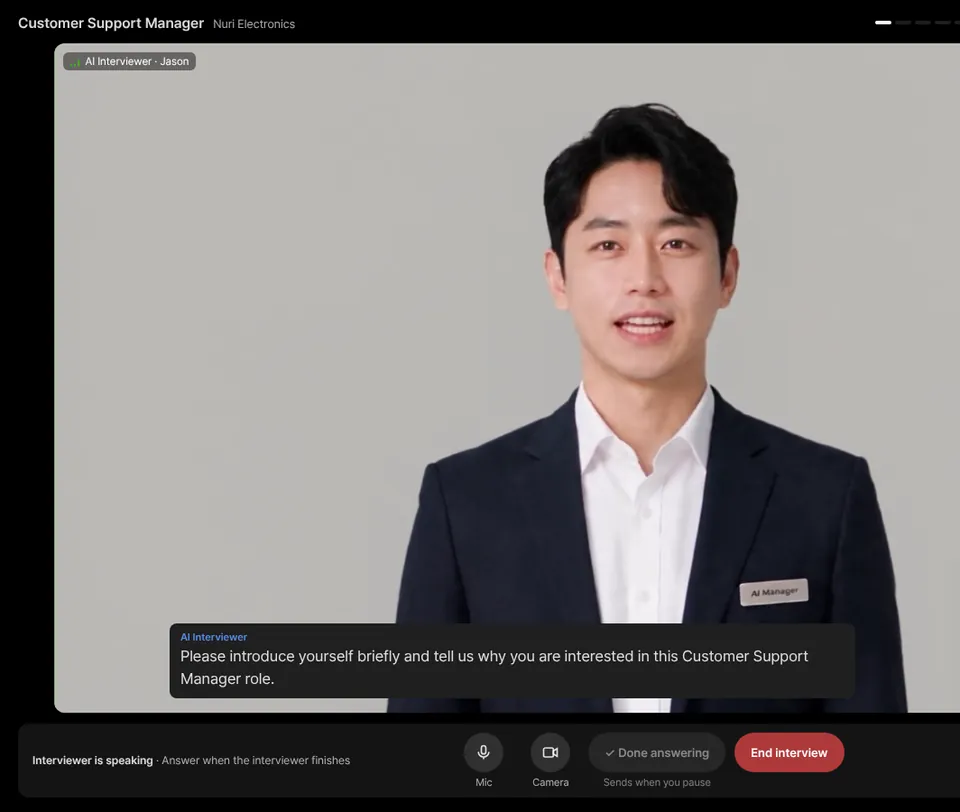
Candidates interview on their own time
Evenings, weekends, between shifts. The AI interviewer asks each question, follows up on vague answers, and wraps up when time runs out. If a connection drops, they reopen the same link.
- 4
Sort, review and decide
Sort candidates by overall score or AI recommendation, open the report to check the evidence, and record a hiring decision. Export the list to CSV for your ATS or spreadsheet.
Comparable by design
Same questions, same criteria, same report
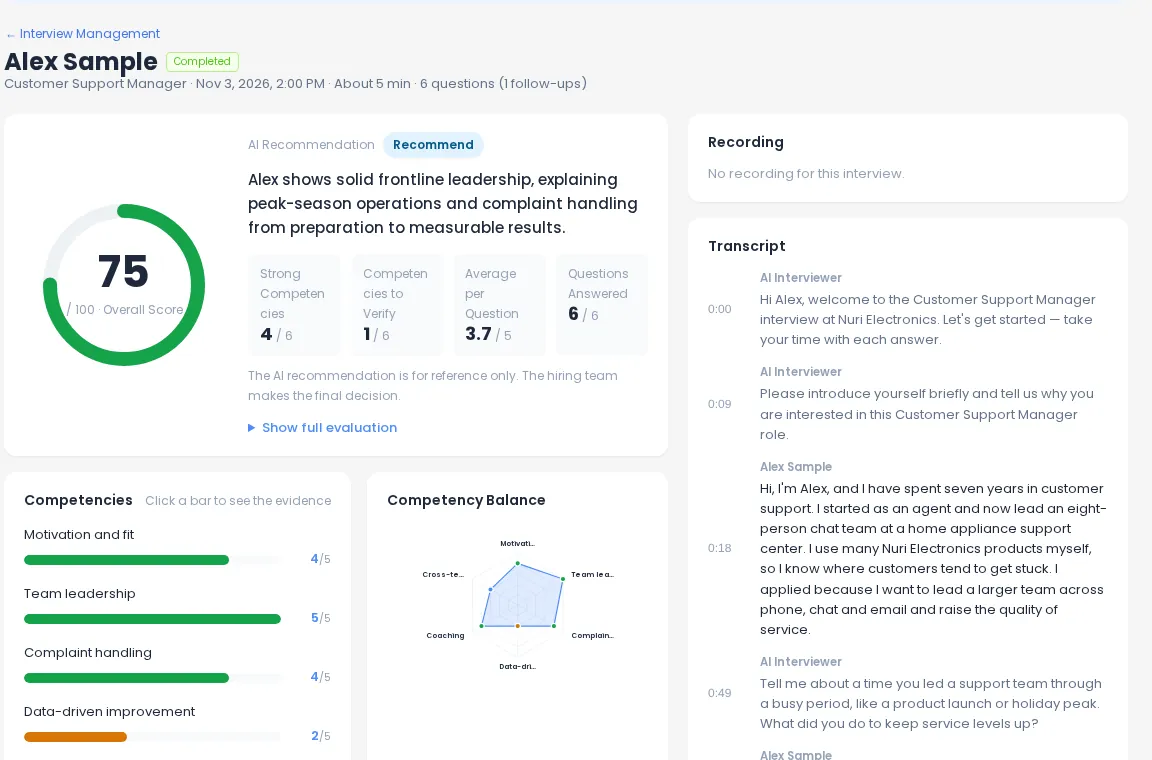
Every candidate for a role answers the same set of questions and is scored on the same competencies. That makes a list of 200 applicants something you can actually sort, rather than 200 sets of notes.
- Overall score out of 100, plus a score per competency and per question
- Click a competency to see the answers behind its score
- Recording and timestamped transcript to check anything that looks off
Two ways to invite
A shared link for the job ad, personal invites for shortlists
Use either or both in the same project.
| Shared link | Personal email invites | |
|---|---|---|
| Best for | Open job ads and careers pages | Applicants you already have in your ATS or a spreadsheet |
| How it’s sent | You paste one link anywhere | Up to 50 recipients at a time, “Name, email” per line |
| Who can take it | Anyone with the link | Only the invited person, once |
| Deadline | Open while the project is active | Closes after the number of days you choose |
| Reminders | — | Automatic reminders to people who haven’t started, plus a one-click reminder to all pending |
Features that fit
What volume teams use most
Questions from the posting
Role-specific questions in minutes, so you can open a new requisition the same day.
Question generatorScored reports & CSV export
Sort by score or recommendation, then export name, status, score, recommendation and decision.
Scored reportsIntegrity signals
On Hiring Team, tab-leave and paste counts are kept in the report for reference, with a notice to candidates.
Interview integrityCandidate experience
No account, any time, in the candidate’s language, with a short warm-up before the real questions.
Candidate experienceAPI & MCP
Create interviews and pull results from your own systems on Hiring Team and Enterprise.
API & MCPTeam review
Up to 5 seats on Hiring Team to comment and decide together.
See plansRecommended plan
Hiring Team for volume roles
Volume hiring needs more than one interview running at a time. That’s the main difference between the plans for this use case.
| Recruiter | Hiring Team | Enterprise | |
|---|---|---|---|
| Price | $49/mo · $39/mo billed annually | $179/mo · $143/mo billed annually | Custom quote |
| Interviews included | 40 a month | 150 a month | Custom |
| Extra interviews | $1.5 each | $1.5 each | Volume pricing |
| Interviews at the same time | 1 | 30 | Custom |
| Active projects | 50 | Unlimited | Unlimited |
| Seats | 1 | 5 | 6+ |
| Bulk invites, reminders, CSV/PDF | ✓ | ✓ | ✓ |
| Integrity signals, API & MCP | — | ✓ | ✓ |
High-volume hiring FAQ
Can I put one interview link in my job ad?
Yes. Each project has a shared invitation link you can paste into a job ad, careers page or auto-reply. Anyone with the link can take the interview, so each completed interview uses one interview from your plan. If you see unexpected volume, check where the link has been posted.
How many candidates can interview at the same time?
It depends on the plan: Free and Recruiter run 1 interview at a time, and Hiring Team runs up to 30 at once. For more than that, Enterprise limits are set per contract.
What happens when we go over the included interviews?
On Recruiter and Hiring Team you keep going at $1.5 per extra interview. Included interviews reset monthly and don’t roll over.
Does the AI reject candidates automatically?
No. The AI recommendation is for reference only. Your team reviews scores, evidence and the recording, and records the decision for each candidate.
Can candidates do a work task, like a customer call, after the interview?
Yes, as an option. Candidates who finish the interview can continue with a role-play task against an AI customer, and the result appears in the interview report. This needs a separate Realplay subscription.
What do candidates need?
A browser with a camera and microphone. No account or app. A desktop browser is recommended.
Open your next volume role with an AI first round
Start with 5 interviews · 10 min total, no card needed. Upgrade when the applicants arrive.