
How it works
From job posting to scored report in four steps
Set up a role once, send one link to every applicant, and let an AI avatar interviewer run a structured first-round video interview. Your team reviews the report and decides who to meet next.
Free plan · 5 interviews · 10 min total · no card needed
Overview
The whole workflow at a glance
Each position is a project. The questions, settings and invite link live in that project, and every candidate’s report lands in the same place.
- 1
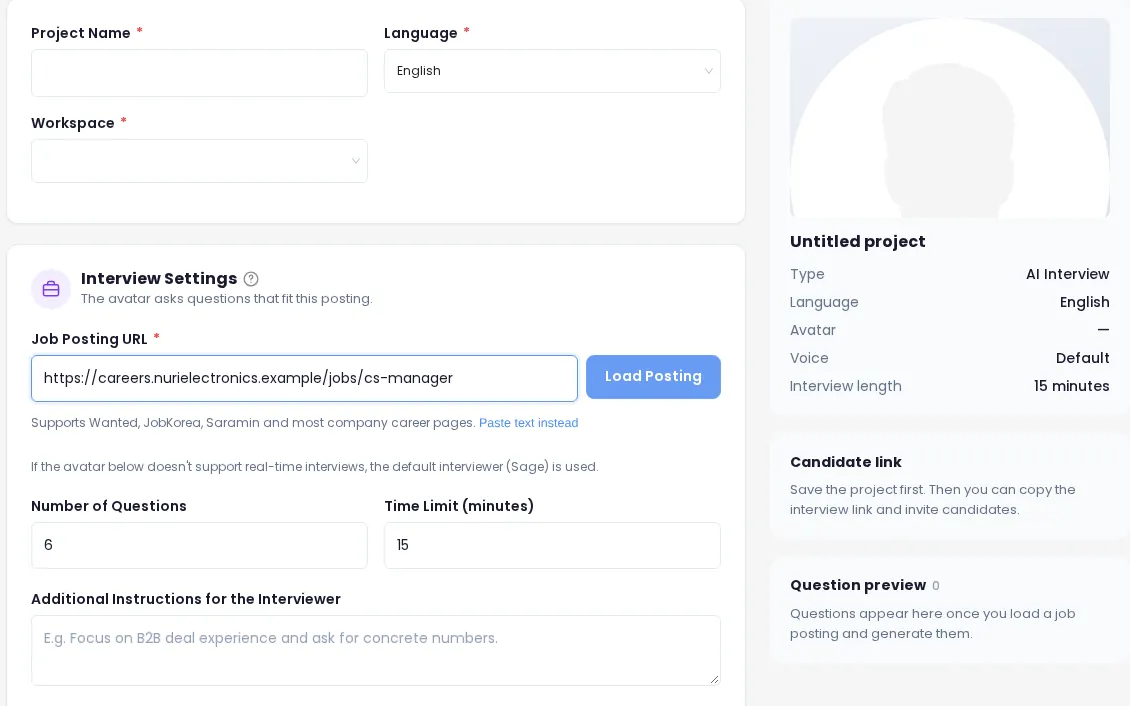
Add a job posting
Paste a job posting URL or the posting text. AI Interview reads the responsibilities and requirements and drafts questions and competencies for the role.
- 2
Review questions and settings
Edit the questions, set the count (3–12) and the time limit (5–60 minutes), choose follow-ups and add instructions for the interviewer.
- 3
Invite candidates
Share a public link on a job board or send personal email invites. Candidates take the interview whenever it suits them, without signing up.
- 4
Review reports and decide
Compare overall, competency and per-question scores with the evidence, the recording and the transcript. Record your team’s decision for each candidate.
Step 1
Add a job posting
Start a new project and add the posting the way you already have it. Major job boards and many company career pages can be read straight from the URL. If a page can’t be read, paste the posting text instead, or write the job details yourself.
- Responsibilities and requirements are pulled out of the posting for you
- Questions and the competencies to score are drafted from those details
- Questions are written in the interview language you choose
Step 2
Review questions and settings
Everything the AI generates is a draft. Edit, delete, add or regenerate questions, then tune how the interview runs.
| Setting | What you control |
|---|---|
| Number of questions | Between 3 and 12. The default is 6. |
| Time limit | Between 5 and 60 minutes (default 15). On the Free plan, interviews share 10 minutes in total. |
| Follow-up questions | On or off. When on, the interviewer asks up to one follow-up per question based on the answer. Turn extra questions off to ask only the planned questions. |
| Resume-based questions | If a candidate uploads a resume before starting, 2–3 in-depth questions based on it are added after the self-introduction. |
| Instructions for the interviewer | Plain-language guidance, for example “Focus on B2B deal experience and ask for concrete numbers.” |
| Required questions & criteria | Up to 5 must-ask questions and 10 evaluation criteria for the position, 200 characters each. |
| Interviewer & language | Pick the avatar interviewer and one of 12 interview languages. |
| Voice & expression scoring | Optional. Only runs for candidates who agree on the start screen, and isn’t available in the EU. |
Step 3
Invite candidates your way
Save the project and the interview link is ready. Use one or both invite types for the same role.
Public link
Anyone with the link can take the interview. Put it on a job board, in an application auto-reply or in a message. Make the interview private at any time to stop new starts; interviews already in progress can finish.
Personal email invite
An invite for one person, with their name and email filled in and a deadline. Edit the email subject and add your own message. Send several at once with bulk invites (Recruiter plan and up).
Reminders
Send a reminder to everyone who hasn’t started, or turn on automatic reminders 3 days after inviting and 2 days before the deadline.
Candidate side
What candidates see
Candidates don’t need an account. A desktop browser with a camera and microphone is recommended.
A short, guided interview on their own schedule
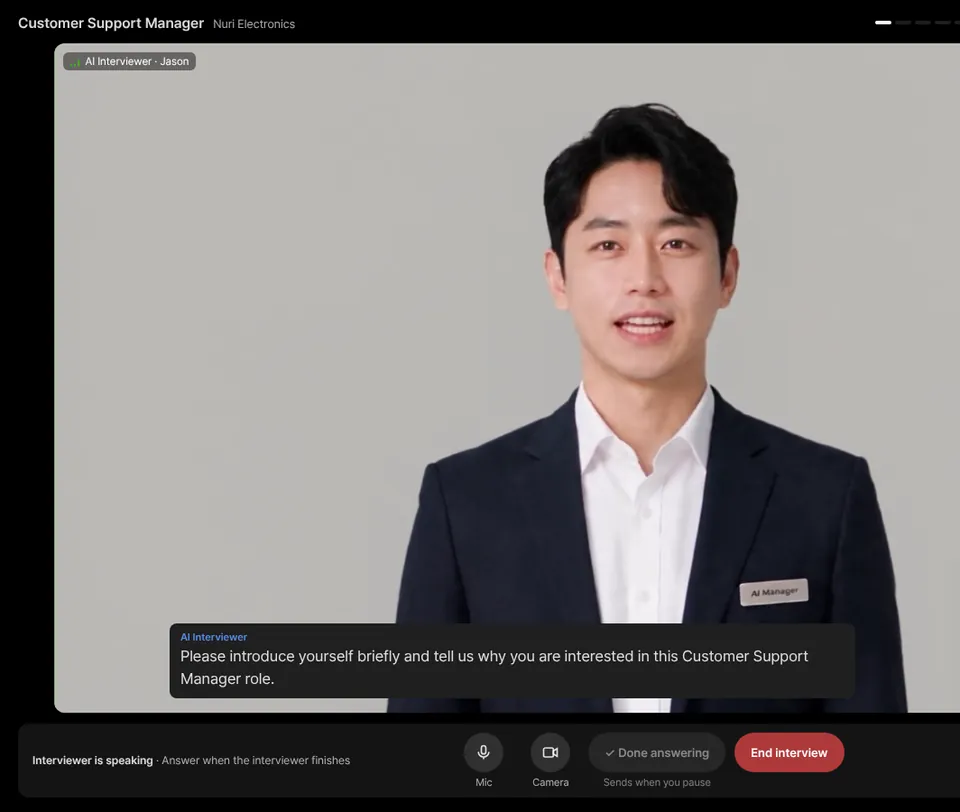
The candidate opens the link, enters their name, agrees to recording and can optionally upload a resume (PDF, DOCX or TXT, up to 5MB; the file itself is not stored). After the camera and microphone turn on, the AI interviewer greets them and asks the first question.
- The candidate answers out loud and presses “Done answering” when finished
- Follow-ups adapt to each answer, like a conversation with a person
- If the connection drops, they can come back in with the same link
- At the end, candidates can choose to see AI feedback; it isn’t shared with you and shows no scores
Step 4
Review reports and decide
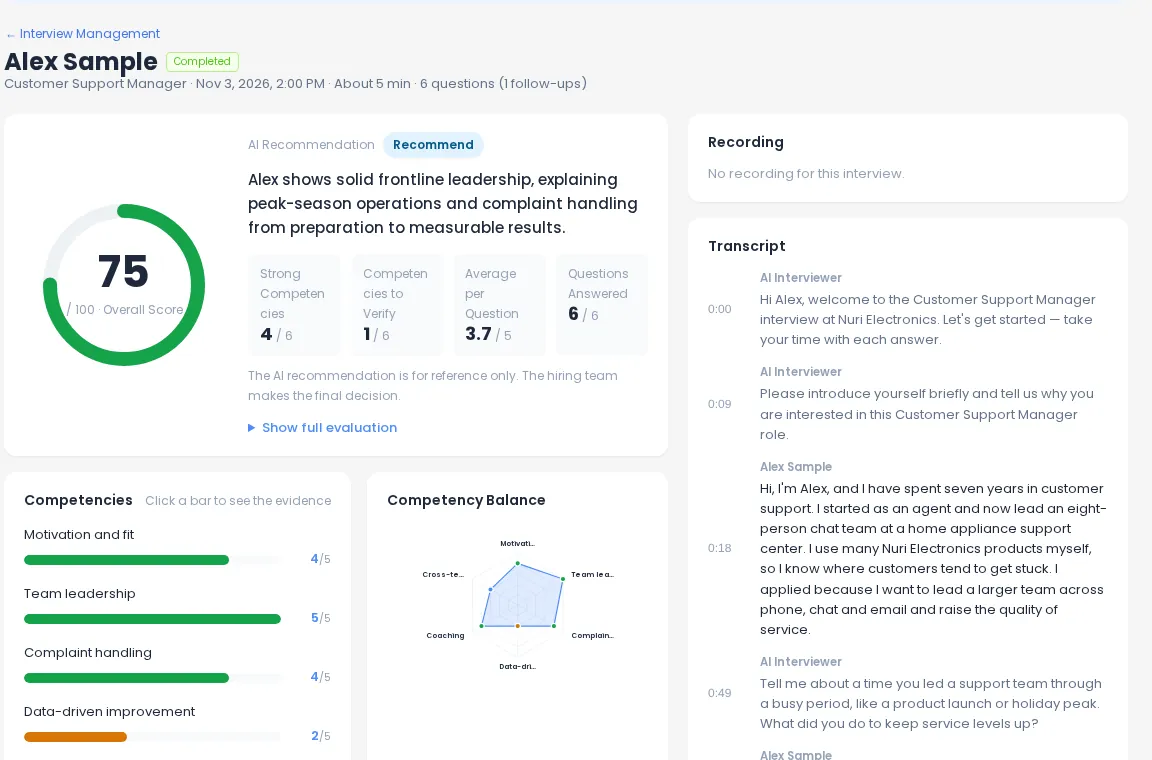
When an interview ends, a report is created for that candidate. Open the results list for the position, sort by score or AI recommendation, and drill into any candidate.
- Overall score, competency scores and per-question scores with evidence
- Recording and full timestamped transcript side by side
- Team opinions and a pass / hold / fail decision per candidate
- Save as PDF, export the list as CSV or share a time-limited link
Tips
Get better first rounds from day one
Take it yourself first
Preview the candidate screen and run the interview once. Previews aren’t counted in your candidate results.
Match time to questions
Plan about 2 minutes per question, plus room for follow-ups. Six questions in 15 minutes is a good starting point.
Use must-ask questions
Put deal-breakers, such as work authorization or shift availability, in required questions so every candidate answers them.
Write instructions plainly
Tell the interviewer what to dig into, like specific tools, numbers or customer situations.
Pick the candidate’s language
Set the interview language for the role, from 12 options, and regenerate questions if you change it.
Decide as a team
Share results with teammates to collect recommend / hold / do-not-recommend opinions before you decide.
Frequently asked questions
How long does it take to set up an interview?
Most of the work is done for you. Add a job posting, check the generated questions and settings, and save. You can then copy the public link or invite candidates by email right away.
What is the difference between a public link and a personal invite?
Anyone with the public link can take the interview, so it works on a job board or in a message. A personal invite is for one person only: their name and email are filled in, it has a deadline, and they can complete it once.
What happens if a candidate’s connection drops?
They open the same link again. On a personal invite, if the interview is still in progress, they continue from the question they were answering and the remaining time keeps counting from the first start; otherwise it starts again from the beginning. A personal invite allows up to 3 starts; once the candidate finishes or ends the interview, it is closed. You can allow a retake from the results list if needed.
Can I take the interview myself before inviting anyone?
Yes. Preview the candidate screen and take the interview once to see exactly what candidates experience. Your own preview attempts are not included in candidate results.
What counts toward my plan?
Each candidate who takes the interview uses 1 interview from your plan. The Free plan includes 5 interviews and 10 interview minutes in total, given once at sign-up; paid plans allow up to 60 minutes per interview. See pricing.
Does the AI decide who moves forward?
No. The AI recommendation is for reference only. Your hiring team reviews scores, evidence and the recording, and records the final decision.
Run your first AI interview today
Start with one job posting. It’s free, no card needed.