
Scored reports
Scores you can check against the recording
When an interview ends, AI Interview writes a report for that candidate: scores for each competency and each question, the answers behind them, and the full recording and transcript. Your team compares candidates and makes the call.
AI recommendation is for reference only. People make the final decision.
Inside a report
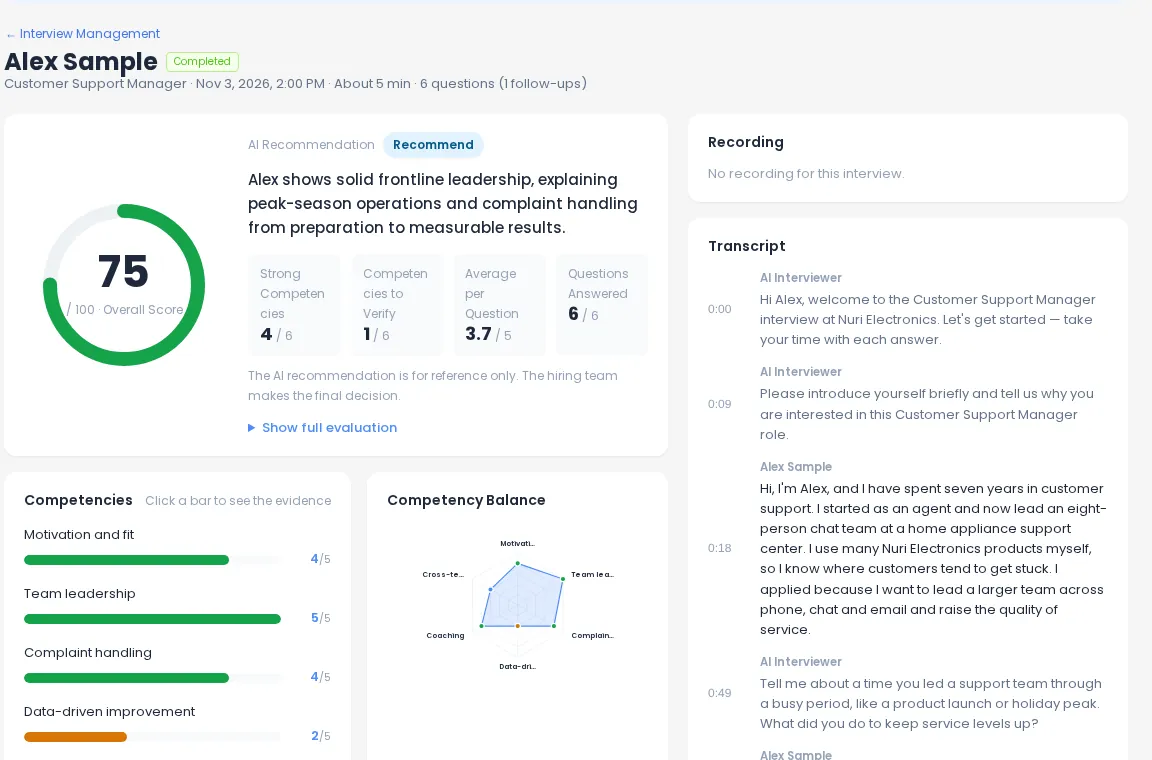
Three levels of scoring, one screen
Start with the overall picture, then drill down to the exact answer behind any score.
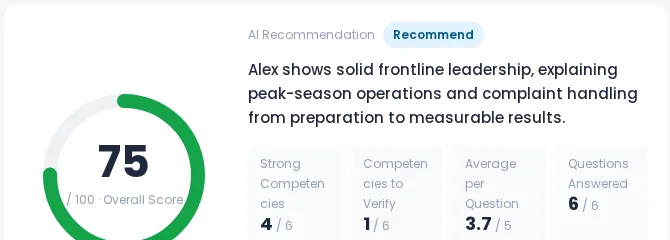
Overall score
An overall score out of 100 with an AI recommendation, so you can see at a glance where a candidate stands.
Competency scores
Each competency scored as strong (4–5), average (3) or needs review (1–2), with a balance chart of strong competencies and ones to verify.
Per-question scores
A score for every question, an answer summary and key highlights, with follow-up questions marked.
Evidence
Every score comes with its reasons
A number on its own is hard to trust. Click a competency bar to see the answers that produced the score, read the strengths and concerns, and jump to the exact moment in the recording.
- Evidence of strength and concerns written from the transcript
- “Questions for the next interview” to probe what’s still unclear
- Click a time in the transcript to play the recording from there
- Speaking metrics such as pace, pauses and filler words, only with the candidate’s consent
Recording & transcript
See and hear the whole interview
Full recording
Replay the interview to see how the candidate answered, not just what the summary says.
Timestamped transcript
Every question and answer in order, with times you can click to jump in the recording.
Integrity signals
On Hiring Team, tab-leave and paste counts are kept in the report for reference.
Interview integrityAI recommendation
A second opinion, not the decision
The report includes an AI recommendation so you can triage quickly. It is labeled for reference only and is not used as the hiring decision. The decision field belongs to your team.
- The AI recommendation is for reference only
- The final decision is made by people on your hiring team
- Reports that can’t be scored fairly are marked “Not evaluable”
Decide together
Team opinions and hiring decisions
Bring the people who will work with the hire into the first round without adding meetings. Team reviews and hiring decisions are on Hiring Team and Enterprise.
- 1
Share the results
Send a link by email or copy it. Teammates can view the report and recording without signing in, for 14 days.
- 2
Collect opinions
Each reviewer leaves recommend, hold or do not recommend, with an optional comment. Opinions are kept separate from the final decision.
- 3
Record the decision
Set pass, hold or fail for each candidate. The report shows who made the decision.
Compare candidates
All results for a position in one list
Filter, sort and export
The results page gathers every candidate across your projects. Narrow it down to one position and work through the list without opening each report.
- Filter by position and status, and search by name, email or project
- Sort by newest, highest score or AI recommendation
- Hide on-hold candidates to focus on who’s left
- Completion rate and average score at the top
- Save any report as PDF; export the list as CSV
Plans
Report features by plan
| Free | Recruiter | Hiring Team | Enterprise | |
|---|---|---|---|---|
| Report after every interview | ✓ | ✓ | ✓ | ✓ |
| Detailed competency reports | — | ✓ | ✓ | ✓ |
| PDF / CSV export & share links | — | ✓ | ✓ | ✓ |
| Team reviews & hiring decisions | — | — | ✓ | ✓ |
| Tab-switch & paste logs | — | — | ✓ | ✓ |
| REST API & MCP | — | — | ✓ | ✓ |
Frequently asked questions
What is in an interview report?
An overall score, competency scores, per-question scores with answer summaries and evidence, strengths and concerns, questions to ask in the next interview, the recording and the full timestamped transcript, plus an AI recommendation for reference.
Does the AI recommendation decide who gets hired?
No. The AI recommendation is for reference only and is not used as the hiring decision. Your hiring team reviews the evidence and records pass, hold or fail.
Can teammates give their opinion without an account?
Yes. Share the results by link or email and teammates can leave a recommend / hold / do-not-recommend opinion with a comment. Opinions are kept separate from the final decision.
How long does a shared link work?
Anyone with the link can view the report and recording without signing in for 14 days. You can cancel a link at any time.
What can I export?
Save any report as a PDF, and export a position’s candidate list as CSV with name, email, status, overall score, AI recommendation, hiring decision and date. Export and share links are on Recruiter and above.
What if an interview can’t be scored?
If no questions were answered, or the camera was off for most of the interview, the report is marked “Not evaluable” instead of showing a misleading score.
See your first report today
Create an interview, take it yourself and open the report. Free, no card needed.